Tasks and to-dos for travel agencies: What you have to do today, as soon as you sign in
Tasks and to-dos in the management software for travel agencies.
On Home, To-do sorts your tasks into Overdue, Today and Upcoming. You create them from To-do, from Create or from a booking or a passenger and, if your agency turns them on, Tripwise creates the ones to collect the balance before departure and to call after the trip.
In short
With Tripwise tasks, every user at the travel agency sees on To-do, on Home, what is overdue, what is due today and what comes up in the next days. They create tasks from To-do, from Create or from a booking or a passenger, and the agency can turn on two automatic ones: collect the balance before departure and call after the trip. At 8 a.m. the alert with the day's tasks arrives.
Every task, with its date and what it came from
A board by due date for every user, with their own tasks and the automatic ones.
To-do, on Home
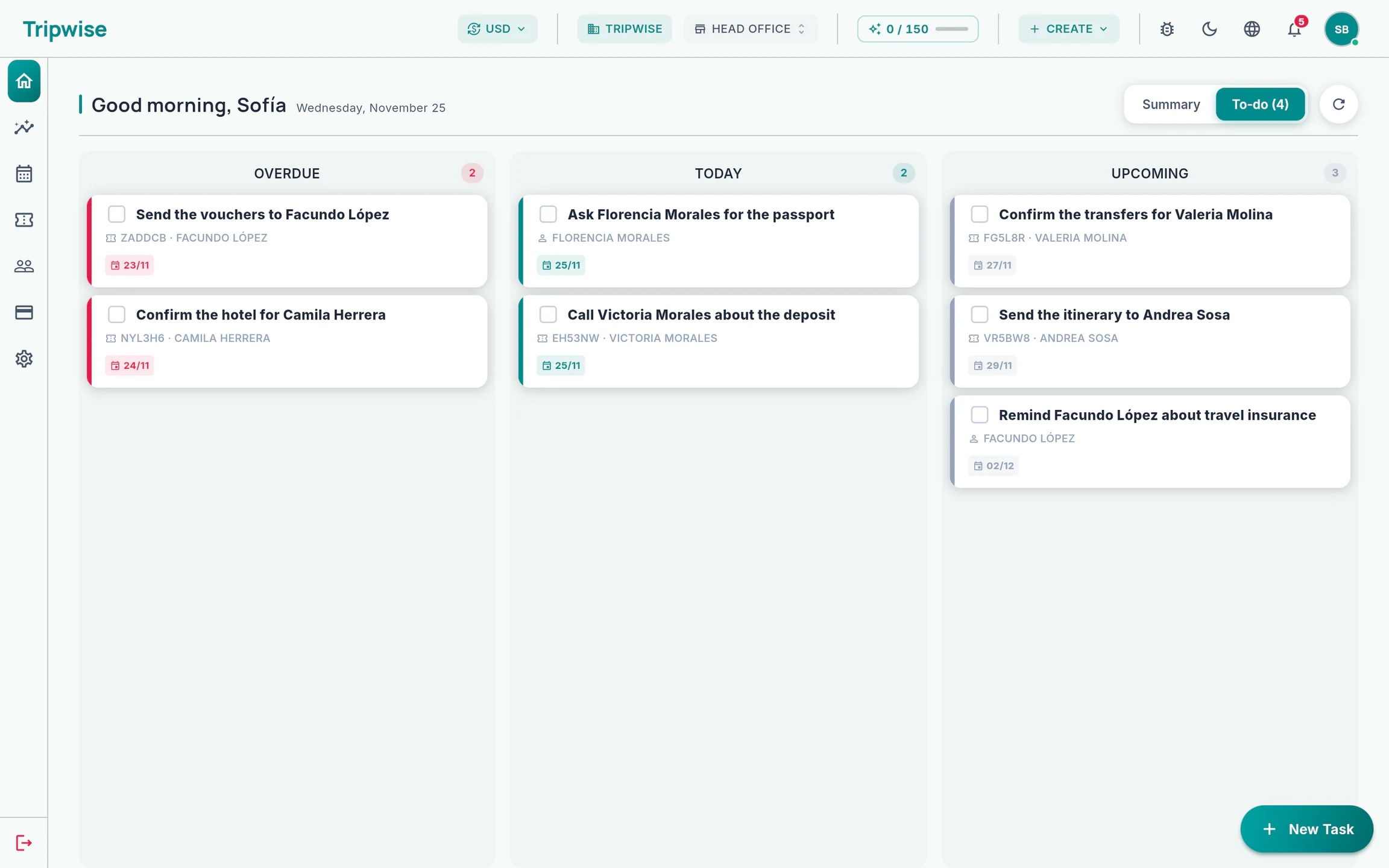
Next to Summary, To-do shows your tasks in three columns: Overdue, Today and Upcoming, each with its count. On the phone it is a list with the same groups. The selector shows how many are overdue and due today, so you see it as soon as you sign in.
- Overdue, Today and Upcoming
- The count on the selector
- A board on the computer, a list on the phone
New Task, from wherever you are
Create it from To-do, from Create at the top, or from the menu of each booking and each passenger. Give it a title, a due date in one tap (Today, Tomorrow, In 3 days or In a week) or with the calendar, and notes if needed.
- To-do, Create, Bookings and Passengers
- Due date in one tap
- Title and notes
See alsoBookingsPassengers
Linked to a booking or a passenger
A task created from a booking shows its code and holder, and tapping it takes you to the booking. Created from a passenger, it carries their name: to ask them for their passport, for example. You can also create standalone tasks, from To-do or from Create.
- With the code and the holder
- One tap opens the booking
- Standalone tasks, too
Automatic tasks
Under Configuration › Automatic tasks, Administrator and Supervisor turn on two rules and pick their days: collect the balance before departure (30 days before by default, if there is a balance in any currency) and call after the trip (one day after by default). Each task goes to the booking's seller and closes on its own when the balance is covered or the booking is canceled.
- Collect the balance before departure
- Call after the trip
- They close on their own
See alsoCollections
Tasks due today
At 8 a.m., every user with tasks due that day gets Tasks due today by bell and push, with how many there are, and tapping it opens To-do. Each user turns it on or off under Configuration › Notifications, like every other alert.
- At 8 in the morning
- Bell and push
- Opens To-do
See alsoAlerts and reminders
Everyone, their own tasks
Each user sees the tasks they created and the automatic ones for the bookings they sell. Administrator, Supervisor, Seller and Costs use them. Tasks are postponed in one tap, checked off when done, and a new task shows up on To-do without refreshing.
- Each user, their own
- Postpone and complete in one tap
- In real time
Frequently asked questions
Tasks in Tripwise
What we get asked most about tasks and to-dos.
You do. Each user sees on To-do the tasks they created and the automatic ones for the bookings they sell. Administrator, Supervisor, Seller and Costs use them, each with their own.
Yes. From the booking's menu, New Task creates it linked: it shows the code and the holder, and tapping it opens the booking. Tasks are also created from a passenger's menu, or standalone from To-do and from Create.
Two, if the agency turns them on under Configuration › Automatic tasks: collect the balance before departure, when there is a balance in any currency, and call after the trip. Each one goes to the booking's seller, with the days the agency picked, and closes on its own when the balance is covered or the booking is canceled.
You check it off and it stays struck through, in case you want to undo it. The next time it loads, To-do shows only what you still have to do.
With Tasks due today: at 8 a.m., a bell and push alert with how many tasks are due that day. Tapping it opens To-do, and each user turns it on or off under Configuration › Notifications.
Explore the other modules
Your agency's whole back-office, in one place.
Alerts and reminders
Check-in 24 h before, trips, documents and installments, to whoever has to act.
Learn morePassengers
One record per person, with their documents, recognized on its own as you build the booking.
Learn moreCollections
Collections per group and currency, installment plans, payment receipts and operator payments.
Learn moreFinance & commissions
What you pay, what you charge and every booking's profit, with VAT split out for VAT-registered agencies.
Learn moreSeller commissions
Volume tiers, splits across several and override, calculated as the booking is saved.
Learn moreTake control of your agency today
Start free in minutes. No card, no installs. Your operation, organized from day one.