Import wholesaler bookings with AI: Load wholesaler bookings without typing
Import wholesaler bookings with AI from the PDF or a photo.
Upload your wholesaler's confirmation as a PDF or a photo and AI extracts passengers, flights, dates and costs, building the booking ready to review. Included on every plan, with a monthly import quota.
In short
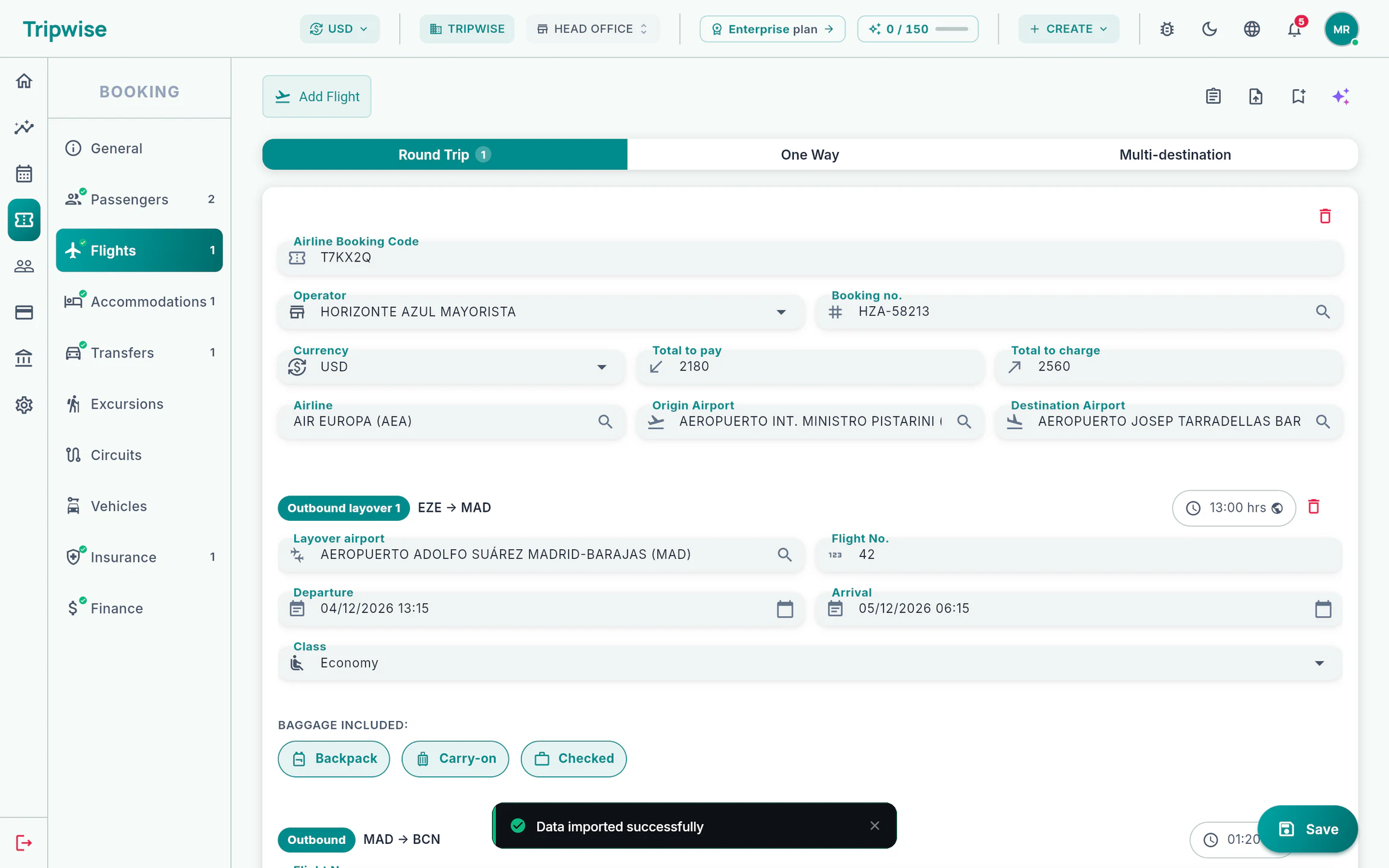
Tripwise's AI import reads the wholesaler's confirmation as a PDF or a photo and creates the booking with the passengers, the flights with their stops, the airline locator, the dates and the costs, ready to review. It is tuned for OLA and DELFOS documents, works with any operator's, and is included in every plan with a monthly quota.
From the wholesaler's PDF to a created booking
Stop re-typing what the wholesaler already sent you. AI does it for you.
Reads the wholesaler's PDF or photo
You upload the confirmation as PDF, PNG, JPG or WebP and AI reads it all. It has parsing rules tuned for OLA and DELFOS documents, and works with any operator's.
- PDF, PNG, JPG or WebP
- Tuned for OLA and DELFOS
- And any other operator
Several files, one booking
When a booking comes split across several files, you upload them together and they become one. If one cannot be read, the ones that were read correctly are kept.
- Several files per booking
- Keeps the ones that read fine
- Up to 20 MB per file
Extracts the key data
Passengers with their document, flights with their layovers and each leg's airports, dates and costs come out of the file and load into the booking automatically. The outbound and return flights stay in a single booking, with the airline locator and the operator's booking number.
- Passengers and documents
- Round trips with layovers
- Dates and costs
See alsoBookings
Respects the booking type
If the booking is an Air + Land Allotment, AI fills in the Detail with the whole package; if it is a Cruise, it fills in the cruise section. That way no services are loaded twice.
- Air + Land Allotment
- Cruise
- No duplicated services
See alsoAir + Land Allotment
A monthly quota on every plan
Every plan includes AI imports per month (40, 60 or 150), shared with reading purchase invoices. A read that fails is not counted, and if you run short you buy a pack that never expires.
- 40, 60 or 150 per month
- Failed reads do not count
- Packs that never expire
See alsoPricing
It reads supplier invoices too
The same AI loads the purchase invoices of the purchases VAT book: the voucher's photo or PDF goes into a review queue before you confirm it.
- Purchase invoices
- Photo or PDF
- Review queue
See alsoVAT books
FAQ
AI import
The questions we get most about automatic loading.
AI reads any operator's confirmation, as a PDF or a photo, recognizes the operator by its name or logo and extracts passengers, flights and costs. It has parsing rules tuned for OLA and DELFOS documents.
All of them, from the Starter plan, with a monthly quota: 40 imports on Starter, 60 on Professional and 150 on Business. If you need more, you buy packs of 50 or 200 that never expire.
AI creates the booking pre-loaded with all the data so you just review and confirm it.
PDF, PNG, JPG and WebP, up to 20 MB each, and you can upload several files for the same booking.
Google Gemini, with a paid key: Google does not use that data to train its models. It is listed as a data processor in the Privacy Policy.
Explore the other modules
Your agency's whole back-office, in one place.
Entry requirements
Visa and passport warnings based on the passenger's nationality and the trip's destination.
Learn moreAgency dashboard
Sales, profit and the team leaderboard for the period, live and one currency at a time.
Learn moreChange history
Who changed what and when, field by field, across the entities that matter most.
Learn moreBookings
Custom, allotment or cruise: passengers, services and profit in one file.
Learn moreAir + Land Allotment
The wholesaler's closed package, loaded as one unit with its expiry date in plain sight.
Learn moreTake control of your agency today
Start free in minutes. No card, no installs. Your operation, organized from day one.