ARCA electronic invoicing for travel agencies: Invoice with ARCA without leaving your booking
ARCA electronic invoicing for travel agencies.
A, B and C invoices with the correct tax condition, a preview of the split into non-taxable, taxable net and VAT before you issue, credit and debit notes, and your brand on the PDF.
In short
Tripwise issues A, B and C electronic invoices and credit and debit notes with ARCA (formerly AFIP) from the booking, with the right tax status for travel agencies that are VAT-registered (Responsable Inscripto) or under Monotributo. Before issuing it shows the split between non-taxed, taxed net and VAT, allows a test invoice against ARCA's homologation environment and prints the PDF with the agency's logo and the QR code.
Electronic invoices, no back-and-forth
Invoice from the same booking and avoid the errors of entering everything twice.
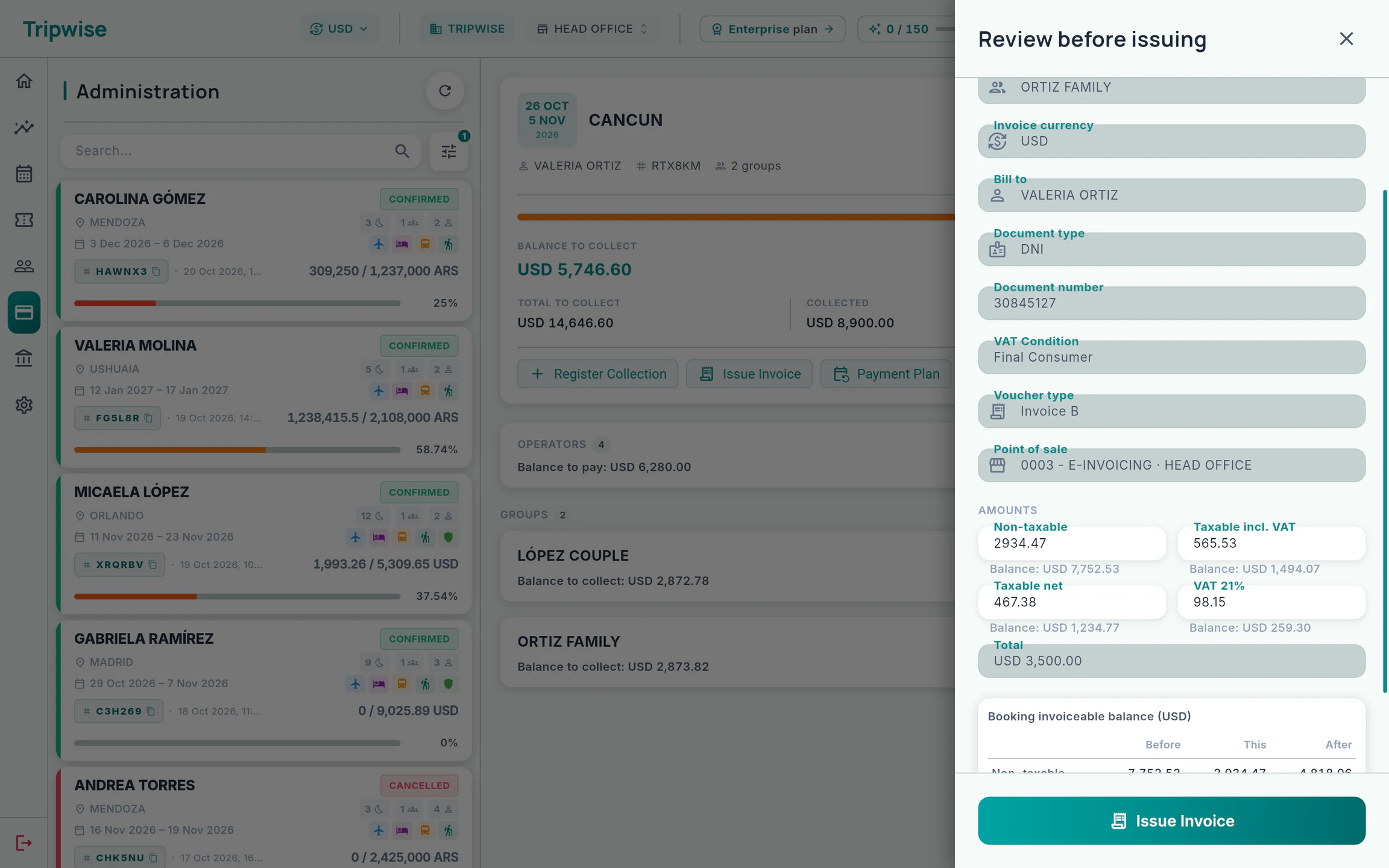
Two-step invoicing, with a preview
First you pick the passenger group, the currency, the amount, the recipient and the point of sale. Then you review the split before issuing: non-taxable, taxable net and VAT, component by component. If what was invoiced goes over what it should, the system flags it and offers to fix it with a credit note.
- Details, then a preview
- Non-taxable, taxable net and VAT
- Over-invoicing warning
See alsoCollections
A, B and C, by who issues and who receives
The agency is VAT-registered or Monotributo, and the recipient's VAT condition is required. That yields the right voucher, including an A invoice to a Monotributo recipient with the legend Law 27.618 requires. C credit and debit notes carry no VAT.
- A, B and C invoices
- A invoices to Monotributo recipients
- Recipient condition required
Credit and debit notes, per component
Notes are issued against the original voucher and with the same per-component split, so a correction keeps the tax breakdown intact. A payment is corrected or voided without a credit note: notes are for correcting the sale.
- Tied to the voucher
- Same per-component split
- For correcting the sale
Your brand on the voucher
The invoice PDF and the payment receipt PDF carry the agency's logo and color, its legal name and its trading name each in its place, and ARCA's QR code to verify the voucher.
- Agency logo and color
- Legal name and trading name
- ARCA QR code
See alsoCollections
A test invoice before the real one
With Test invoice you issue against ARCA's homologation environment: the PDF comes out watermarked and nothing is saved. You can keep the Production and the Homologation certificates active at the same time.
- Homologation environment
- Watermarked PDF
- Nothing is saved
ARCA set up without guesswork
A guide walks you through generating the certificate, the settings check the issuer's details (gross income tax, start of activities, point-of-sale address) and you see ARCA's status per service. When the certificate is about to expire, Tripwise warns you in time.
- Certificate guide
- Issuer checks
- Certificate expiry warning
See alsoVAT books
FAQ
ARCA invoicing
The questions we get most about electronic invoicing.
Yes. You issue electronic A, B and C invoices with the correct tax condition, plus credit and debit notes, integrated into the booking flow. Before issuing you see the split into non-taxable, taxable net and VAT.
Yes: Tripwise pulls the booking's data and gets the CAE, without re-entering everything at ARCA. The one thing you do once is generate the certificate, and Tripwise guides you through it.
Yes. With Test invoice you issue against ARCA's homologation: the voucher comes out watermarked and is not saved in any book or on the booking.
Yes, if the agency is VAT-registered: Tripwise issues the A invoice with the legend Law 27.618 requires.
Related guides
The topic in depth, beyond the module.
How do you choose management software for a travel agency in Argentina?
The criteria for comparing management systems for travel agencies in Argentina.
Read the guideComparison · SoftwareExcel spreadsheets or a management system for your travel agency?
What changes when you move from spreadsheets to a management system, task by task.
Read the guideGuide · Invoicing and VATHow does a travel agency invoice with ARCA (formerly AFIP)?
Which letter each customer gets, how the amount is split and how to invoice in dollars.
Read the guideGuide · Invoicing and VATWhat changed with the Libro IVA Digital, and how does a travel agency file VAT?
What changed with RG 5705 and RG 5707 of 2025, and what to check before filing VAT.
Read the guideExplore the other modules
Your agency's whole back-office, in one place.
VAT books
Sales and purchases with input VAT credit, ARCA verification and the TXT for Libro IVA Digital.
Learn moreAI import
The wholesaler's PDF or photo becomes a loaded booking, ready to review.
Learn moreEntry requirements
Visa and passport warnings based on the passenger's nationality and the trip's destination.
Learn moreAgency dashboard
Sales, profit and the team leaderboard for the period, live and one currency at a time.
Learn moreChange history
Who changed what and when, field by field, across the entities that matter most.
Learn moreTake control of your agency today
Start free in minutes. No card, no installs. Your operation, organized from day one.