Collections and payment plans for travel agencies: Know who owes you and when each installment falls due
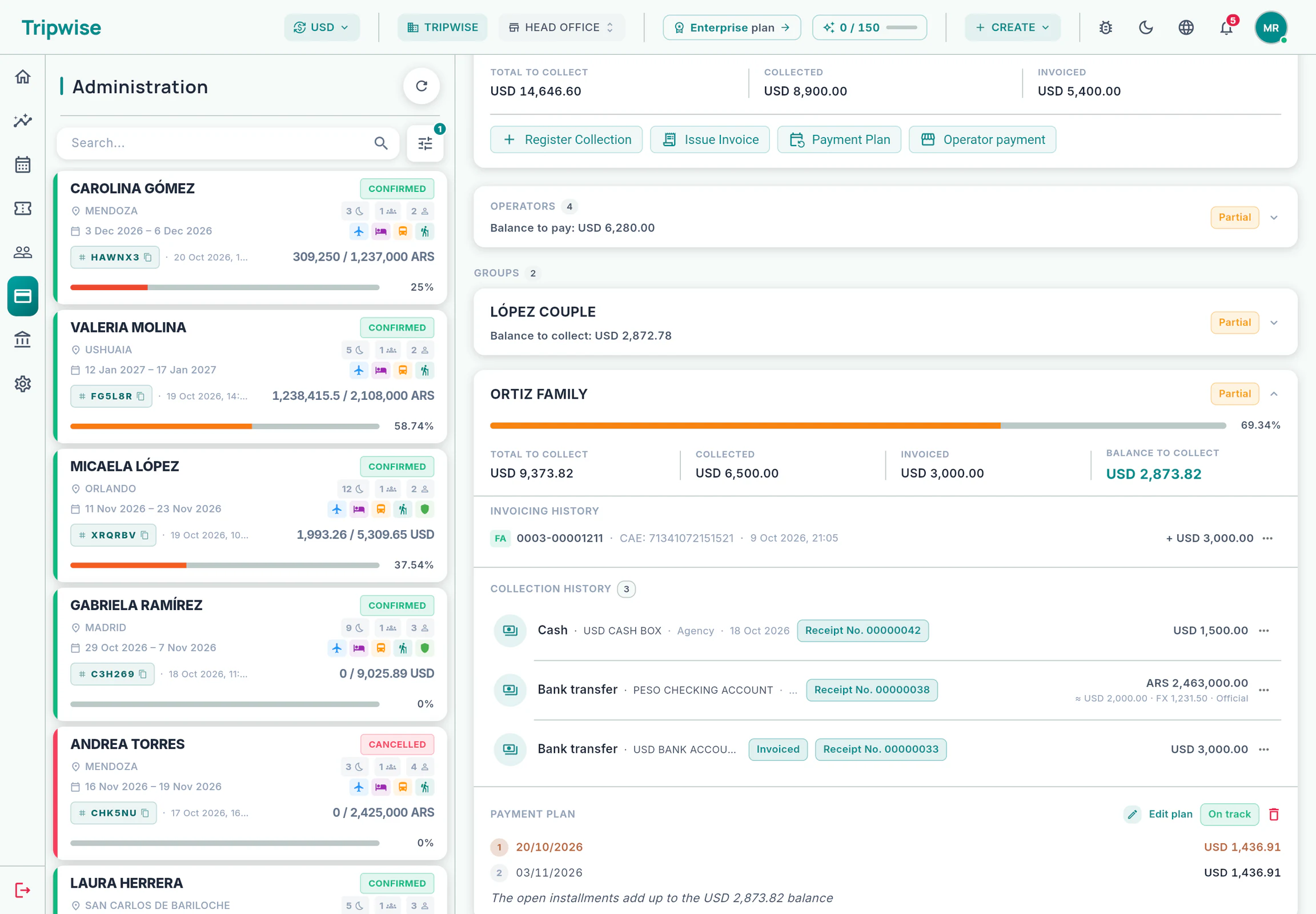
The collections and operator payments of the management software for travel agencies, on the Administration screen.
Every booking splits into passenger groups, and each group carries its own account per currency. Record the payment, the balance drops on its own and its payment receipt is issued. If the passenger pays in installments, you set up the payment plan and Tripwise flags each due date. On the other side, the operator payment.
In short
Collections, the Administration screen in Tripwise, keeps each passenger group's account by currency: total to collect, collected, invoiced and balance. The travel agency records each payment with its payment receipt, sets up instalment payment plans with a reminder before each due date and records payments to operators, with the exchange rate and its source saved.
From the amount owed to the receipt and the invoice
The Administration screen brings together what comes in, what goes out, what is owed in installments and what you have already invoiced.
An account per group and per currency
The booking is split across passenger groups, and each group keeps its own account in each currency: total to charge, collected, invoiced and outstanding balance. The Pending collection, Collected, Pending operator payment and Pending invoicing filters show what is missing on each front.
- Total, collected and balance
- Status per group and per currency
- Filters for collection, payment and invoicing
Installment payment plans
When the passenger pays in parts, you set up a plan per group and per currency: the number of installments, equal or custom amounts, and due dates on the last or first business day of each month, or on dates you pick. Each plan shows whether it is On track, Overdue, No dates left or Collected, installments show on the calendar as INSTALLMENT DUE, and the administration team and the booking's seller get a reminder before each due date. The agency can also turn on the automatic task to collect the balance before departure.
- Equal or custom installments
- On track, Overdue or Collected
- A reminder before each due date
See alsoCalendarTasks and to-dos
A payment receipt for every collection
Every payment can carry its payment receipt: a non-fiscal document naming the passenger who paid, generated once and kept as issued. You download it, email it or share it. If a printed detail changes, a new one is issued and the previous one is voided; and when a payment with a receipt has to go, it is voided and stays on record.
- A receipt naming who paid
- Download, email or share
- Reissuing voids the previous one
Sellers collect too
Administrator, Supervisor, Costs and Seller record payments, with the account the money went into and its receipts, and set up payment plans on any of the agency's bookings. Invoicing and paying operators stays with Administrator, Supervisor and Costs.
- Payments with account and receipts
- Payment plans
- Invoicing and operator payments, for administration
Collect in one currency, cancel debt in another
If the debt is in dollars and the passenger pays you in pesos, you record both, and the balance drops by the equivalent in the debt's currency. You pick Oficial, Blue, MEP or manual, and the system stores which rate you used, when it was quoted and which account the money went into.
- Payment and debt currency
- Oficial, Blue, MEP or manual
- With the account it went into
See alsoMulti-currencyCash flow
Operator payments, the other side of the ledger
The balance with each operator derives from the services loaded on the booking, per booking, operator and currency. You record each payment with its receipts, the rate and the account it left from. Administrator, Supervisor and Costs see it.
- Per booking, operator and currency
- With receipts and the rate
- For Administrator, Supervisor and Costs
You invoice before or after collecting
The invoicing cap is the uninvoiced balance of each group and currency, counting credit and debit notes, whether or not it has been collected. Partial invoices are allowed, and each payment links to the invoices on its own. A payment is corrected or voided without a credit note: a voided one stays struck through, with its reason and date, and credit notes are for correcting the sale.
- Before or after collecting
- Partial invoices allowed
- Void with a mandatory reason
See alsoARCA invoicing
Frequently asked questions
Collections in Tripwise
What we get asked most about payments, installments and balances.
Yes. You record the amount that came in and in which currency, pick which debt currency you are canceling, and enter the exchange rate. The dollar balance drops by the dollar equivalent of what came in. Today you can operate in pesos and dollars.
Yes. You set up a payment plan per group and per currency, with equal or custom installments and due dates on the first or last business day of the month, or on dates of your own. The plan shows which installment is overdue, and the administration team and the booking's seller get a reminder three days before and on each due date.
It is the receipt for each payment, naming the passenger who paid and carrying the legend «DOCUMENTO NO VALIDO COMO FACTURA» (not valid as an invoice). The electronic invoice is issued with ARCA, before or after you collect.
You correct or void it without a credit note: the payment is the money and the invoice is the sale. The invoice stays and links on its own to another payment, or to the next one you record. Credit notes are for correcting the sale, for example when the booking total goes down.
Administrator, Supervisor and Costs, who handle the debt with wholesalers and its receipts. Payments and payment plans are also recorded by the seller, on any of the agency's bookings.
Related guides
The topic in depth, beyond the module.
How do you choose management software for a travel agency in Argentina?
The criteria for comparing management systems for travel agencies in Argentina.
Read the guideComparison · SoftwareExcel spreadsheets or a management system for your travel agency?
What changes when you move from spreadsheets to a management system, task by task.
Read the guideGuide · Money and cashHow do you keep a travel agency's cash in pesos and dollars?
Accounts per currency, cross-currency payments, operator payments and net position.
Read the guideExplore the other modules
Your agency's whole back-office, in one place.
Finance & commissions
What you pay, what you charge and every booking's profit, with VAT split out for VAT-registered agencies.
Learn moreSeller commissions
Volume tiers, splits across several and override, calculated as the booking is saved.
Learn moreMulti-currency
Pesos and dollars with separate balances, and the rate stored with its source.
Learn moreCash flow
Balance per account and currency, movements like a bank statement and the agency's net position.
Learn moreARCA invoicing
A, B and C invoices with a preview, per-component notes and test invoices, from the booking.
Learn moreTake control of your agency today
Start free in minutes. No card, no installs. Your operation, organized from day one.